Digital workflows boast a number of benefits, from increased productivity, error reduction, cost efficiency and better visualisation of organisational process. So how can they be utilised on your enterprise website?
Digital Workflows – How to cut inefficiencies and connect departments
02/11/2023
Digital workflows can help to unify departments and negate any potential disconnect by defining a process and offering visibility to all those involved.

Recently, Forbes Insights partnered with Adobe and Microsoft to conduct research collecting insights from over 600 senior digital and technology executives about their enterprises digital workflows.
The study, titled “Tapping into Advanced Workflows to Grow and Energise your Business” showed that over 50% of those surveyed were in the process of developing their digital processes further, noting numeral benefits that digital workflows have presented to their organisations.
Benefits such as, but not limited to; cost and time savings, error reduction, increased productivity, improved customer experience and increased efficiency.
For enterprises looking to reap the benefits of digitising workflows and utilising automation solutions in their organisations, it is first important to decide how and where these implementations would be best placed.
These decisions should be based on where your organisation would see the best results and the potential ROI.
This blog discusses the possibilities of improving efficiency through digital workflows, with specific focus on the website, and discusses how integrations can help connect different areas of the business and improve overall efficiency.
Customer relationship management (CRM) systems
Customer relationship management is a critical component of any business looking to build and maintain relationships with their customers.
This is especially important for the modern-day profiled consumer, who seeks more personalised interactions with the businesses that they buy from.
A CRM or customer relationship tool like Pipedrive or Hubspot is a great tool to help set up pipelines, track progress and automate growth by identifying quality sales opportunities.
By utilising third-party CRM systems that integrate with your enterprise website, you can gather granular, high quality data on how many organisations are visiting your website and what content they’re interacting with.
These CRMs can also provide you with contact information and the potential of conversion based on a prospects web activity.
Using the data collected via the CRM, New Business or Sales teams can follow up on hot leads armed with insights that allow for more tailored, personalised responses.
For an extra level of convenience, triggers can be set to engage with the aforementioned prospects via automatic email responses.
Many CRMs also offer the opportunity to create web forms in-platform to embed on your website, or alternatively offer integrations whereby website form responses feed directly into the CRM.
Once in the CRM, custom segments can be created to group prospects according to parameters relevant to your business.
These digital workflows help to create a more efficient and streamlined lead generation process, alleviating some of the pressure from your business’ sales and new business teams.
And cross-organisationally, marketing teams can utilise this data to understand key conversion points of the website to analyse trends and key performance indicators within the website and its content.
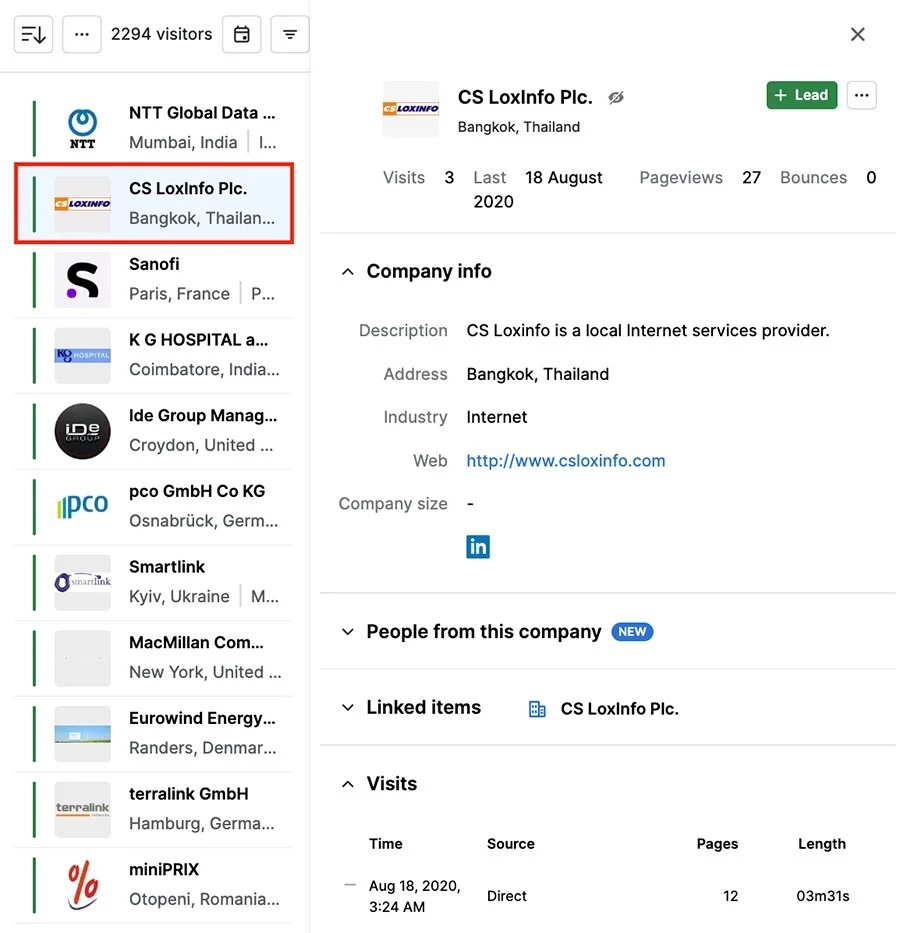
Image Source: support.pipedrive.com
Automated reporting: Google Analytics 4 (GA4)
Earlier this year, Google Analytics 4 (GA4) was released, superseding its predecessor Universal Analytics.
For those businesses that completed the migration to GA4, they were rewarded with a more granular event-based tracking tool, designed to measure traffic and engagement across the organisation’s digital catalogue.
And if as an organisation you have a number of different websites or apps to monitor, this can be a huge undertaking for your marketing teams to manage.
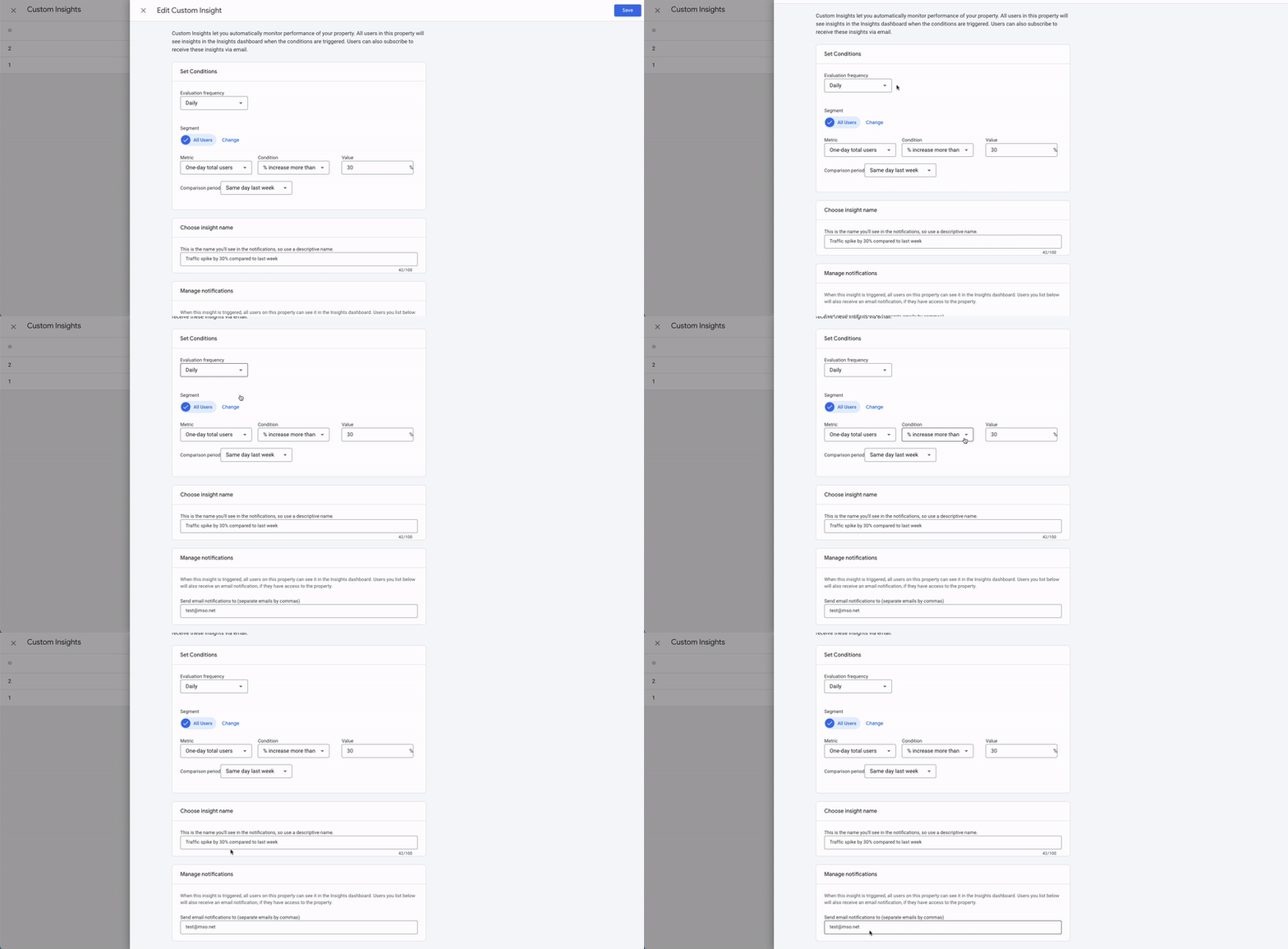
Utilising automated insights via GA4 is therefore a great way to take the headache out of analysing your website’s performance.
By creating reports that include snapshots into key data, your teams can visualise how the website is performing.
You can also set up email alerts to notify team members if an automated insight is triggered.
For example if there’s an anomaly in your daily event count, a sudden drop in traffic, conversions or revenue (if you’re operating an e-commerce site), a trigger can email relevant team members to make them aware.
This is far more efficient than relying opportunistically on uncovering an anomaly as and when the website data is reviewed, allowing issues to be resolved quickly and hopefully without too much of a detriment to your business.
Social Media
Social media is a key part in your businesses digital marketing strategy, but it requires a lot of time and investment to do it effectively.
Ensuring that posts are aligned with your brand, are strategic and have the potential to convert, is a feat for any marketing team.
On the website, social media feeds offer a fantastic way to inject some life into your web pages with dynamic content via the use of social media feed APIs.
Additionally the website can trigger the creation of social posts based on a specific website event.
For example, if you add a new blog post, or vacancy on your website, how convenient would it be if that content is then automatically pushed out across your social media channels?
Whilst each social platform will have its own capabilities and restrictions, there are a number of WordPress plugins available that can allow you to initiate auto posting.
Alternatively, your web agency partner, or a web developer can help set this up for you.
Other third-party marketing platforms, such as MailChimp, boast similar functionality with automation to trigger publishing of a social post when you send an email; which can be used for advising followers of a monthly newsletter, or perhaps new version and release notes for specific products.
By automating this element of the workflow, your marketing teams can be released from the laboriousness of a ‘copy and paste’ exercise across social channels or social publishing platforms such as Hootsuite, freeing up their time for more pressing tasks.
Recruitment
Hiring the right people for your organisation is increasingly difficult in such a competitive marketplace.
A well-planned recruitment process is therefore integral to identifying the right candidates for your advertised role.
If you have a WordPress website, you can look to automate the recruitment and hiring process with the WordPress Job Plugin.
From crafting the perfect job description for your website (and automatically posting to your social channels as per the above) through to vetting candidates, there are a number of comprehensive plugins that can aid you in what can be a lengthy, time consuming process.
Whether through online screening tests or recruitment exams, online CV and cover letter upload capabilities through to interview scheduling via automated emails.
Digitisation of recruitment workflows can vastly streamline the associated administrative time and give HR teams more time to concentrate on those candidates best suited for the role, rather than trawling through hundreds of unsuitable CVs.
It could also negate the need for using a specialist recruitment agency, equalling a cost saving for your business.
Once a candidate has been successful in their application, onboarding can also be served via a secure area of the website and managed by that employee’s leadership team, or line manager.
Get new employees to watch orientation or training videos, digitally sign their employment contract via an integrated online signatory platform such as Docusign and even update emergency contact details that feed into your third party HR platform.

Online Shops / e-commerce functions
If your enterprise website is wholly e-commerce, or includes an e-commerce function, there are a plethora of ways that digital workflows and automation can be used to save time and money.
We use WooCommerce for our WordPress websites, which offers the flexibility and scalability of an e-commerce function whatever the size of your business.
It also integrates with thousands of other platforms to completely digitise the sales, ordering and fulfilment process in a way that’s completely bespoke to your enterprise and its needs.
For example, automated triggers and actions can be applied at various stages of the buying process.
- Example 1: a New Order triggers the addition of the customer’s data to your CRM
- Example 2: a New Customer Sign-up triggers the creation of an Offer/Discount Coupon which is emailed to that customer via your email platform (e.g. Gmail, Office 365) or third-party email marketing platform (such as MailChimp or Benchmark)
- Example 3: a Successful Order triggers the creation of an Order Confirmation email, generation of an Order Note or receipt/invoice from your chosen payment gateway.
- Example 4: a Low Stock notification is triggered and inventory management facilities create a Live Order Recommendation for products, as well as Forecasting Algorithms to anticipate demand.
Post-order automation can be used by marketing teams to request a product / service review, offer other products that customers may be interested in – or simply just to keep in touch as a continuation of building a relationship with that customer.
Our takeaways
Digital workflows give you a clear visualisation of how your enterprise operates and can aid to highlight snags in your operating processes that can help you to identify where changes can be made.
And with the accessibility of technologies that enable cross-platform communication between your website and tools such as CRM’s, E-commerce platforms and Payment Gateways, there really are a multitude of ways that your digital workflows can be uniquely tailored to your organisation and its needs.
These digital workflows can also help to unify departments and negate any potential disconnect by defining a process and offering visibility to all those involved; streamlining and increasing overall efficiency.
Our advice before digitising any workflow, is just to be thorough.
Audit your current workflows, address each one in turn in order of utmost priority, communicate and educate the teams involved to ensure that they’re on board with any changes or new software and then continue to optimise and automate.
But as always, if you’re unsure where to start, get in touch – we’d be happy to help!